Personal Insight
Year
2022-2024
Scope
UI, UX, Research, Accessibility
Compay
Cisco
Designing a trusted productivity insights experience for enterprise employees, without making them feel watched.
My Role
One of three product designers. I owned UX strategy, led user research, authored UI and UX specifications, and drove accessibility implementation end to end.
What is this product?
Webex is Cisco's enterprise collaboration suite used by tens of thousands of organizations globally. Personal Insights is a feature within Webex that gives employees data-driven reflections about their own work habits: how they are collaborating, who they are connecting with, and how their meetings affect their energy and focus.
The core challenge: Webex already had all this behavioral data. The question was whether surfacing it would feel helpful or surveillance-like. That distinction became the spine of everything we designed.
Starting before screen
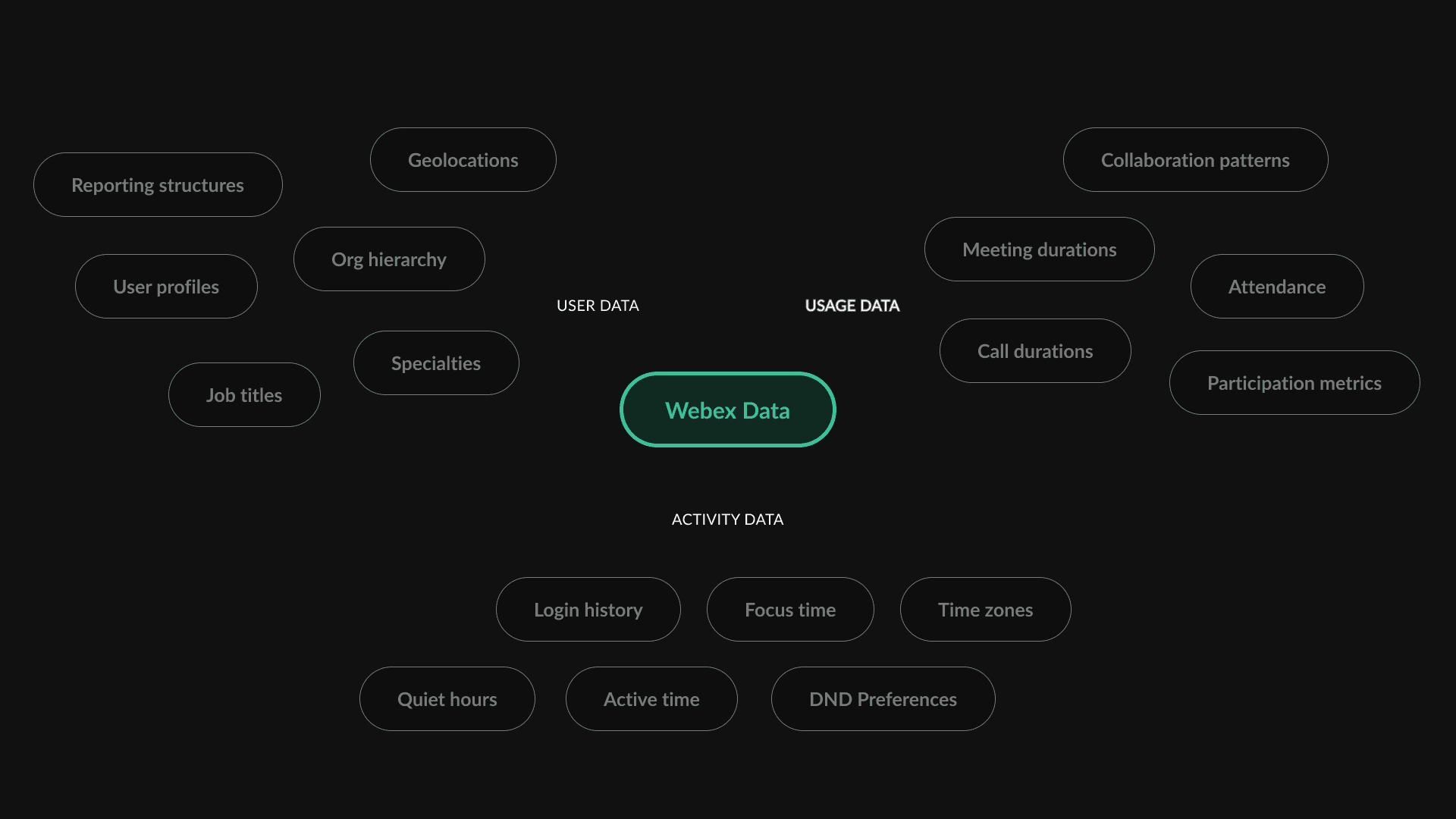
Before touching any UI, I sat with engineers to map what Webex data was actually available to us. Three categories emerged.
User data: org hierarchy, reporting structures, people profiles including job titles, locations, and specialties.
Usage data: meeting and call durations, attendance, participation metrics, and collaboration patterns.
Activity data: login history, active time, quiet hour preferences, focus time settings, and time zones.
This inventory was the foundation for ideation. You cannot design a data product without first understanding what data you actually have and what the emotional weight of each data type might be when surfaced to a real person.
What we designed before we knew what to cut
From the data inventory, we developed four main concepts:
Team Profile, Team Summary, Well-being, and Cohesion, plus Team Creation added at stakeholder request.
I want to show you what we actually designed before the research changed our direction.
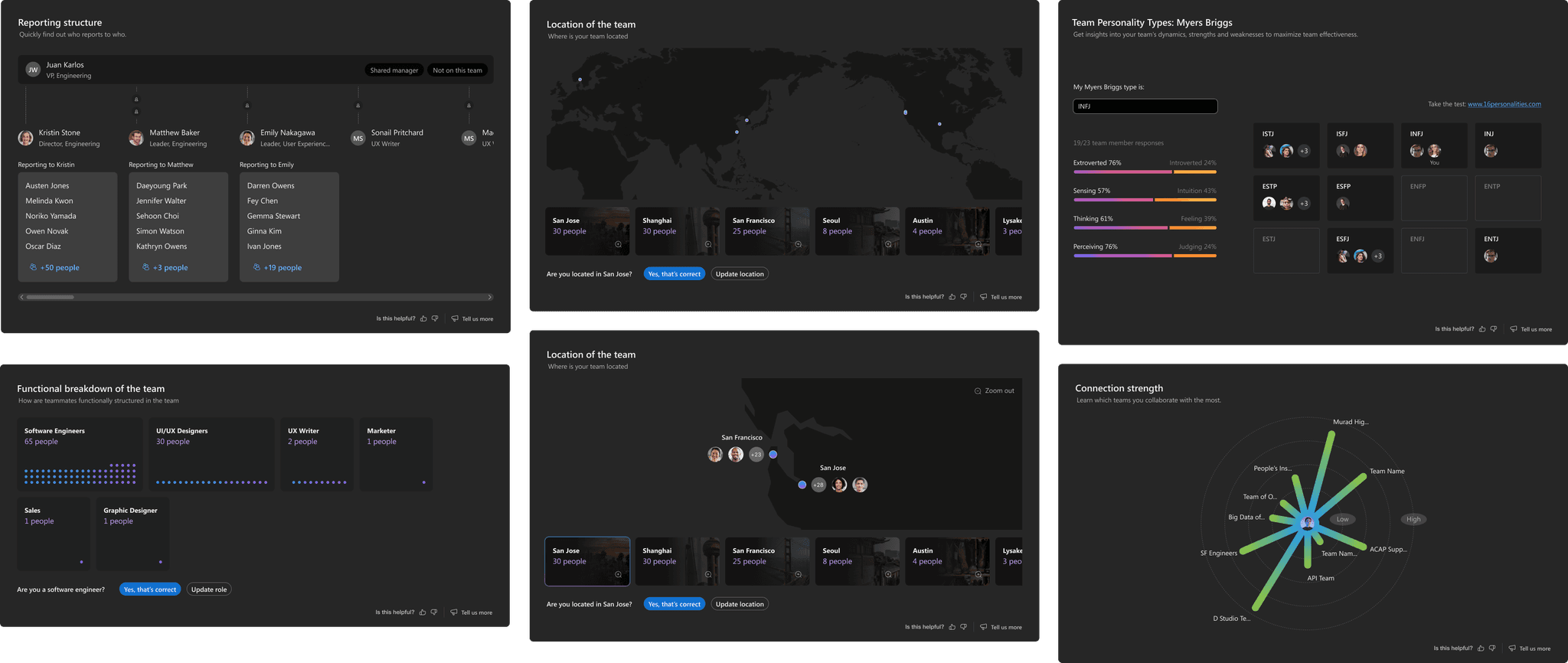
Early Team Profile concept
Team Profile was my first area of ownership. The assumption was that employees collaborate better when they understand their teammates. So I designed a feature showing team structure, member contacts, reporting hierarchy, locations, sentiment, and team personality types using Myers-Briggs. The hypothesis: if you know someone is an introvert or an ESTP, you know how to approach them.
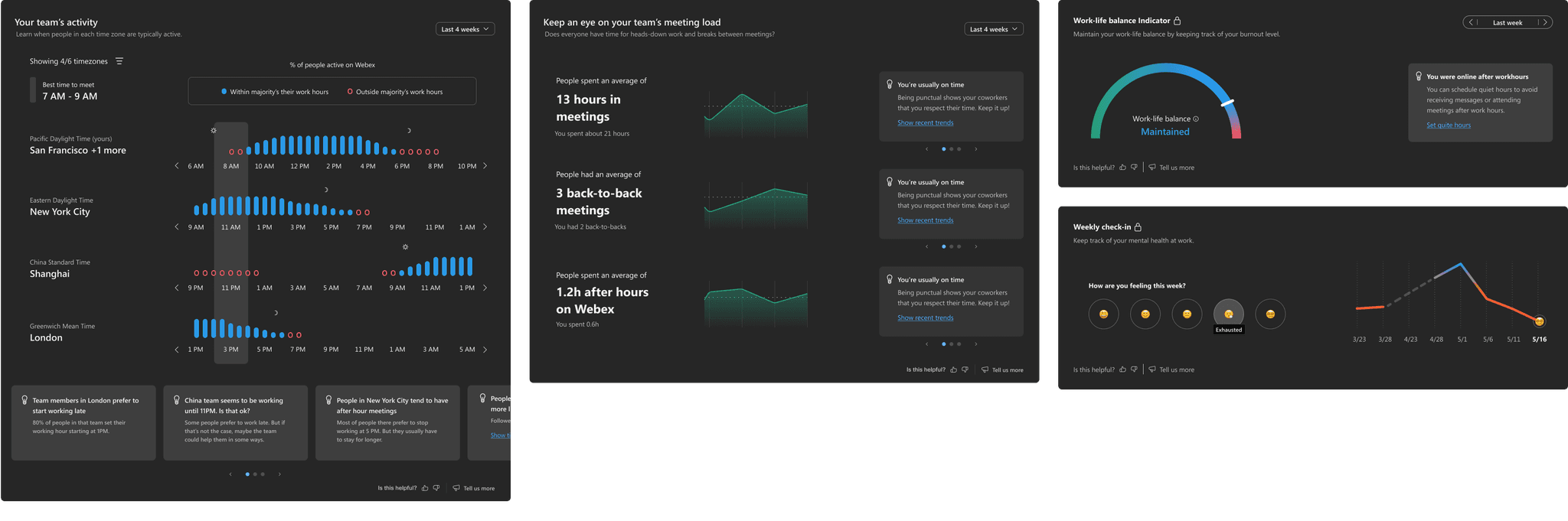
Early Well-being concept
Well-being was the one I found most interesting to design. It used Webex activity data to surface burnout signals, back-to-back meeting counts, and quiet hour disruptions, giving users a picture of how they were doing so they could act on it. Some of it felt genuinely useful in the design phase. Some of it, when held up against real users, felt like surveillance dressed up as helpfulness. We needed research to find out which was which.
Research: what we ran and what it broke
I led a hybrid research approach across two components. First, attitudinal interviews to understand how people felt about having their work patterns surfaced at all. Second, usability testing across all five interactive prototypes to gather behavioral feedback.
The bar we held ourselves to was deliberate: we evaluated concepts on emotional response, not just functional performance. If a concept made someone feel watched, it was out even if the interaction worked cleanly. That is a different standard than most teams use, and I had to make the case for it internally.
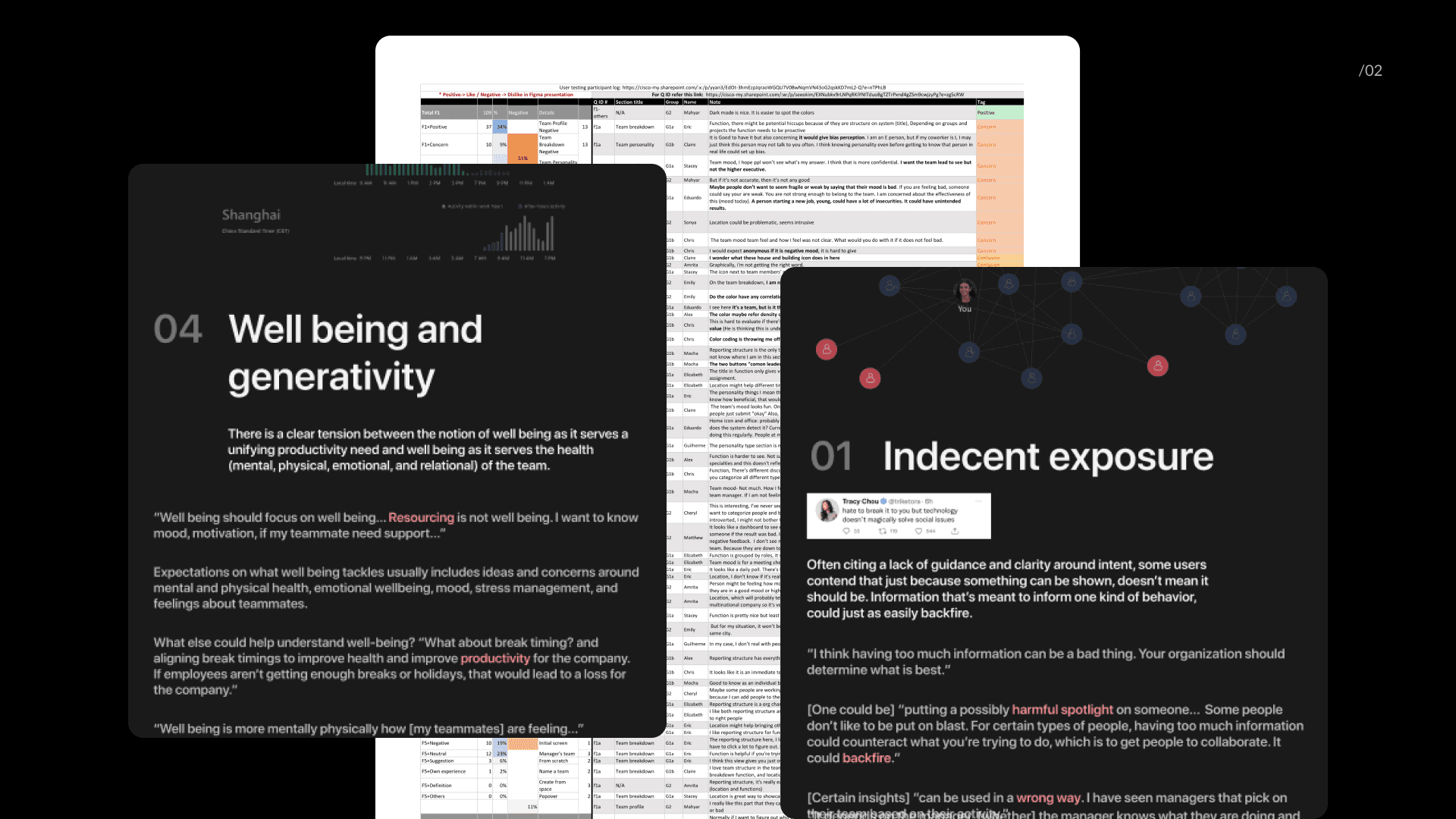
"For certain types of people, having too much information could counteract what you're trying to do. It could backfire."
Four findings changed the direction of the project. Team Profile and Summary got the most positive feedback, but when we dug into why, it was almost entirely about UI look and feel, not the underlying concept. Most client environments would not generate enough data to support the analytics we had designed. Naming conventions confused participants with different people interpreting the same category completely differently. And the finding that mattered most: location visibility and personality typing raised real concerns. Being labeled an introvert in a workplace context felt like a performance signal that could affect how a manager perceived participation in meetings. Once we saw that risk, we could not design around it. We had to design it out.
Four decisions that defined the product
Before & After: Team analytics to personal analytics
The product stopped being an organizational reporting tool and started being something genuinely for the individual. Data that felt like it was for them, not about them. This reframe is where the name Personal Insights came from, not from a branding exercise.
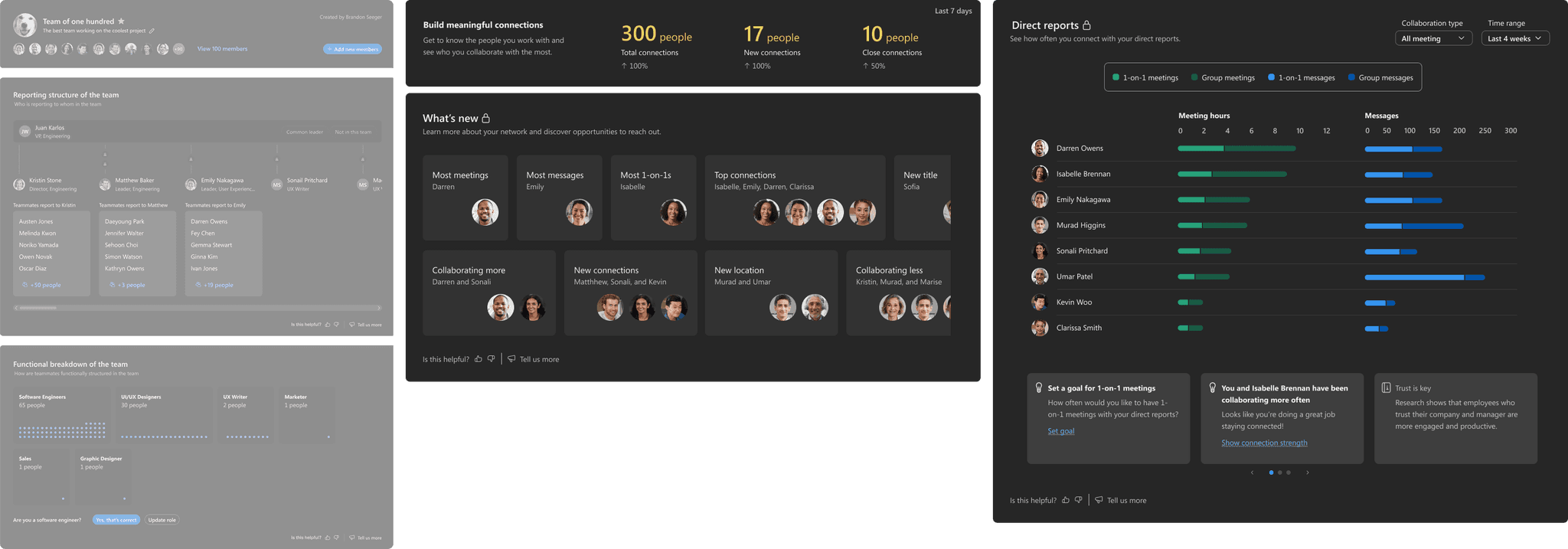
Before & After
Before & After: Geolocation to collaboration patterns
The product stopped being an organizational reporting tool and started being something genuinely for the individual. Data that felt like it was for them, not about them. This reframe is where the name Personal Insights came from, not from a branding exercise.
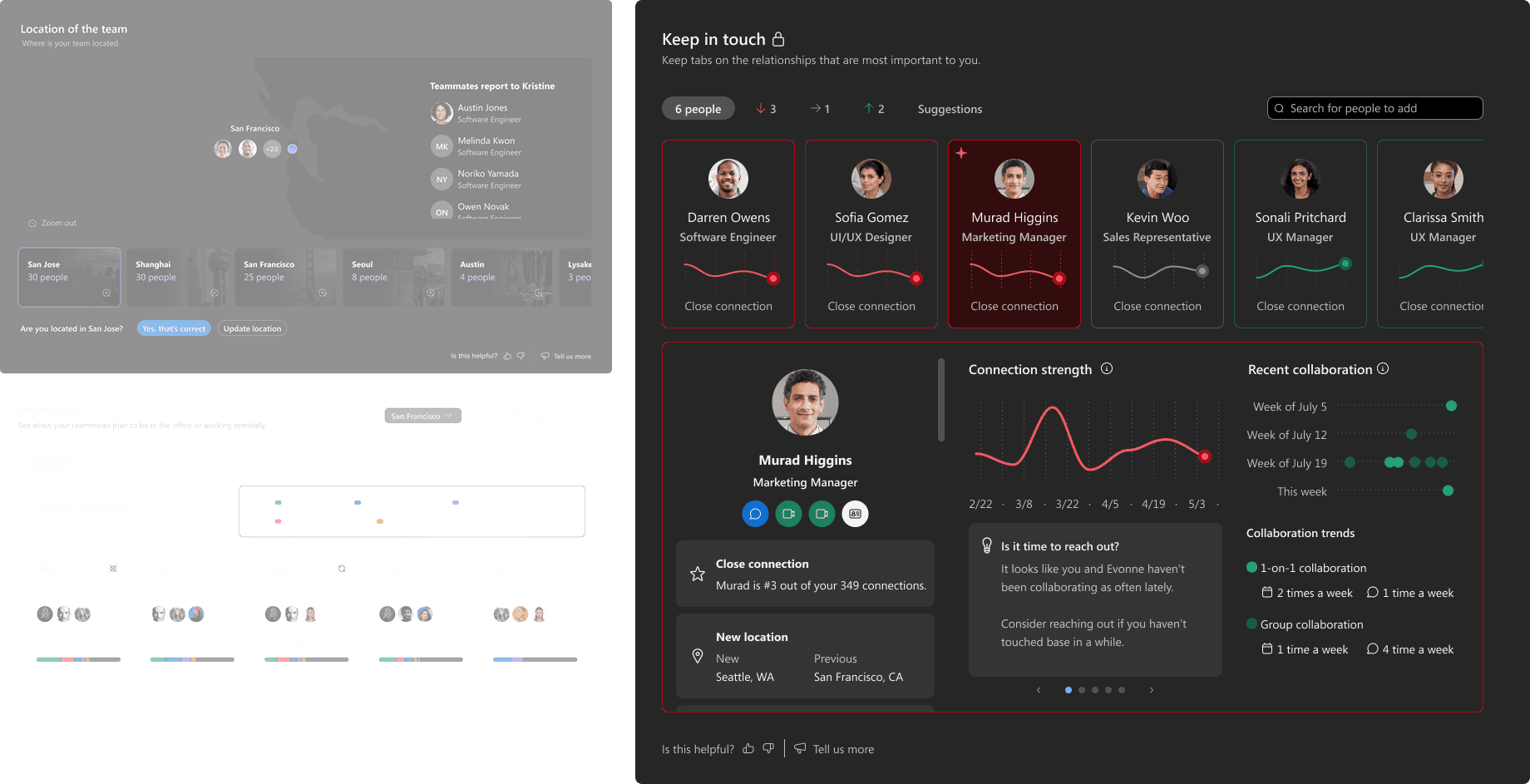
Before & After
Before & After: Personality typing to connection growth
"I don't want to be biased. If I assume someone is introverted, I might not bother them as much."
I designed the Myers-Briggs personality feature. I believed in what it was trying to do. But the research surfaced a specific and concrete harm: in a US and EU enterprise context, being typed as an introvert could become a performance label. It could affect how a manager perceived participation in meetings. We replaced it with a model that tracks the organic growth of actual relationships without scoring or categorizing anyone.
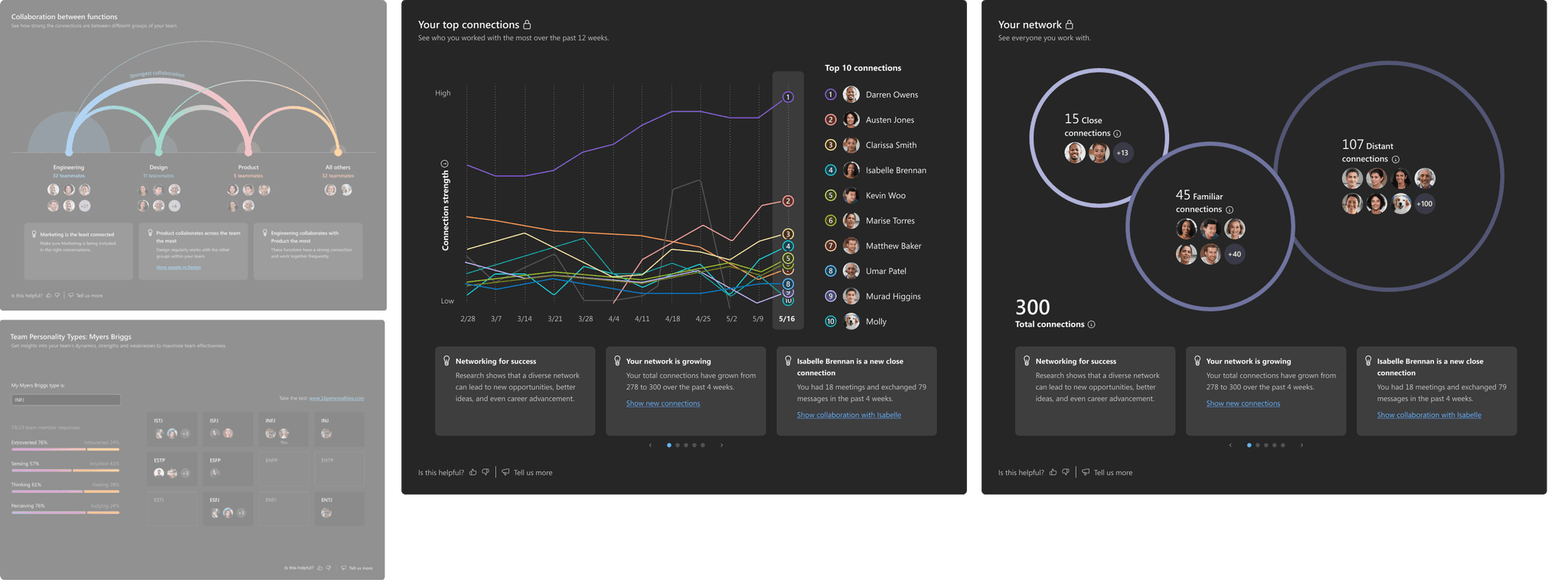
Before & After
Before & After: Team productivity to personal meeting health
I led this section end to end. The insight was simple: showing team-wide productivity data made people feel watched even when the intent was supportive. Shifting to individual meeting health data changed the emotional register entirely. It stopped being something a manager could interpret and became something only useful to the person seeing it.
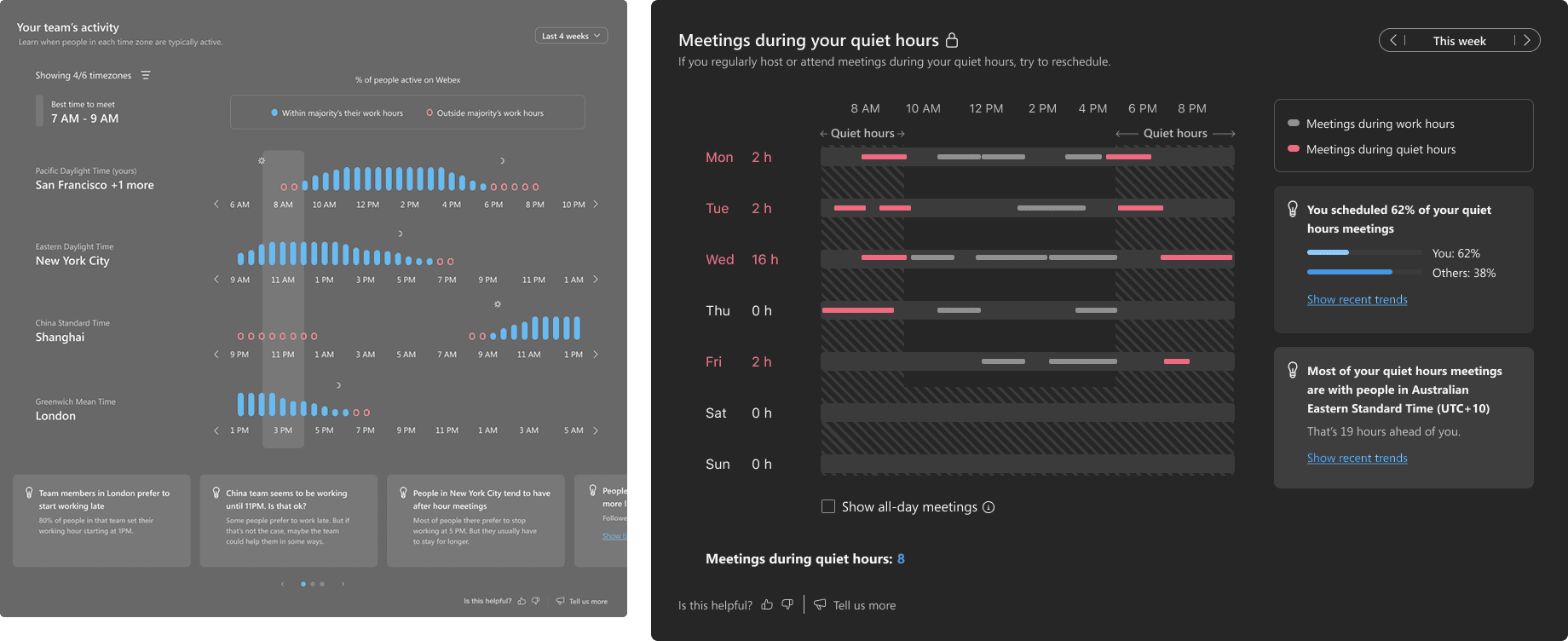
Before & After
The design in detail
Keep in touch feature
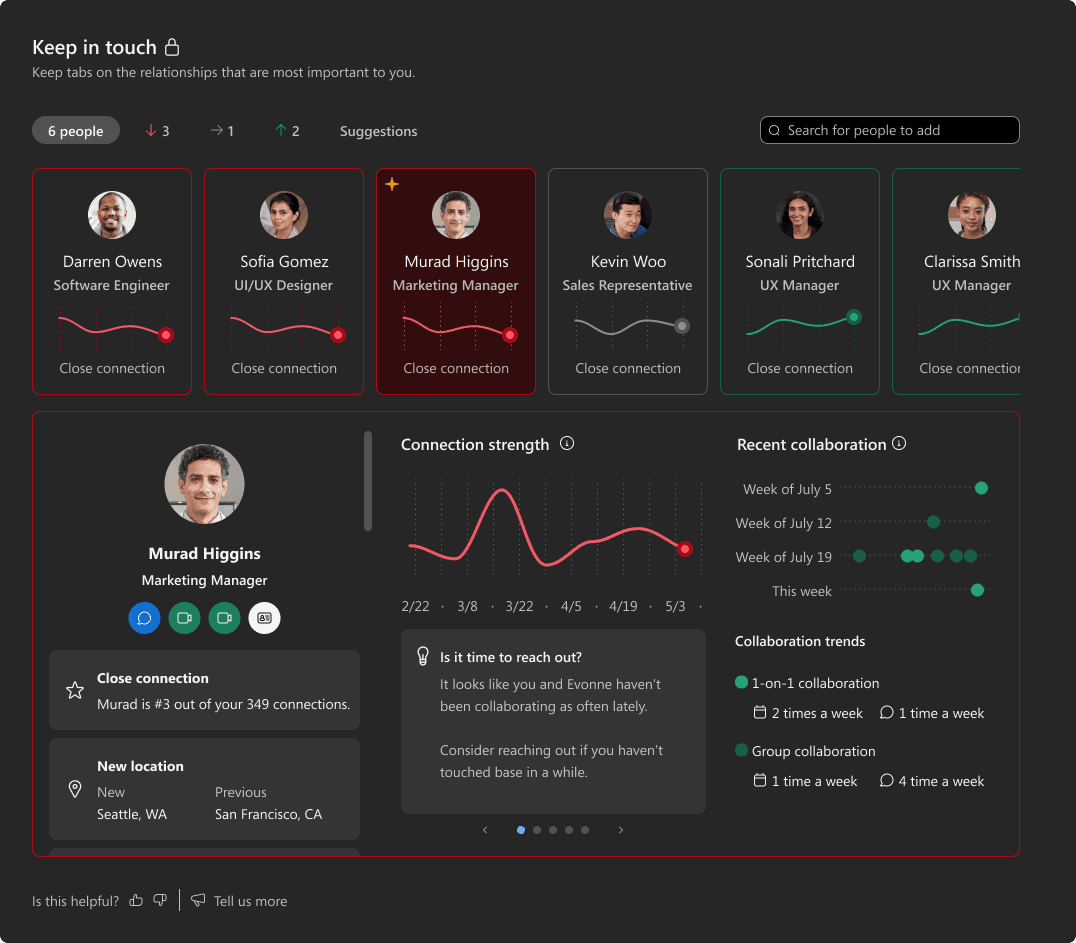
"Only you can see this" — before any data loads
Not legal copy buried in settings. This phrase is the first thing a user reads when they open Personal Insights. Placement before any data answers the research finding that users feared manager access, without requiring them to ask.
Connection strength waveform — shape over score
Trend is communicated through shape, not a number. High, low, direction — all readable without a rating. The red endpoint signals a drop without labeling it as failure. The user interprets meaning themselves, keeping the tool reflective rather than evaluative.
"Is it time to reach out?" — a question, not a command
This card appears contextually when connection strength drops. Copy was workshopped specifically to be a question. "It looks like you and Evonne haven't been collaborating as often lately" gives the user an observation they can act on or ignore. No notification. No pressure. The distinction between a nudge and an instruction is the entire philosophy of this product in one line of copy.
Your top connection feature
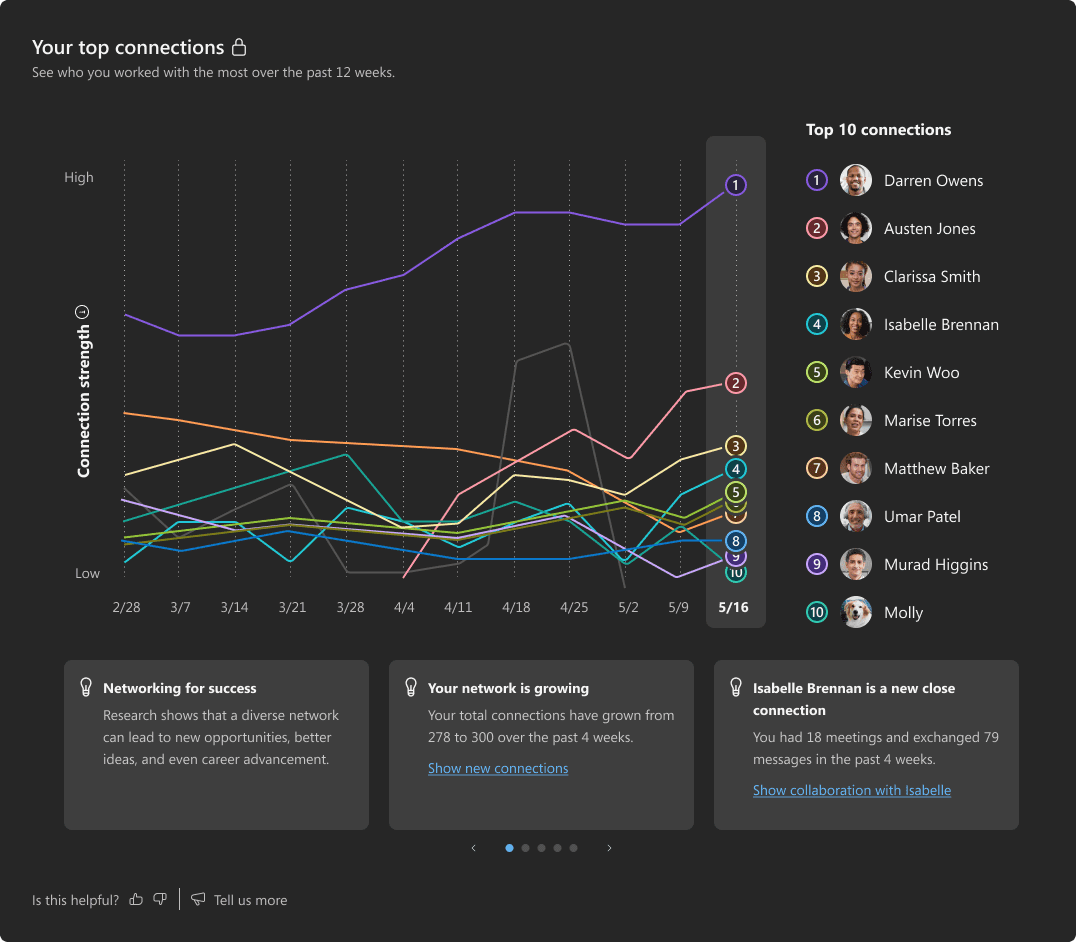
Organic connection growth - with visual nudge
Showing ten people's connection strength over 12 weeks on one chart is a data visualization challenge. The solution: each line is color-coded to its ranking number, not to a person's name. The list on the right anchors color to identity only when the user looks for it. The chart tells the story first. How your network shapes, who dominates, who is dropping, driving organic network growth and nudges for collaboration
Quiet hour feature
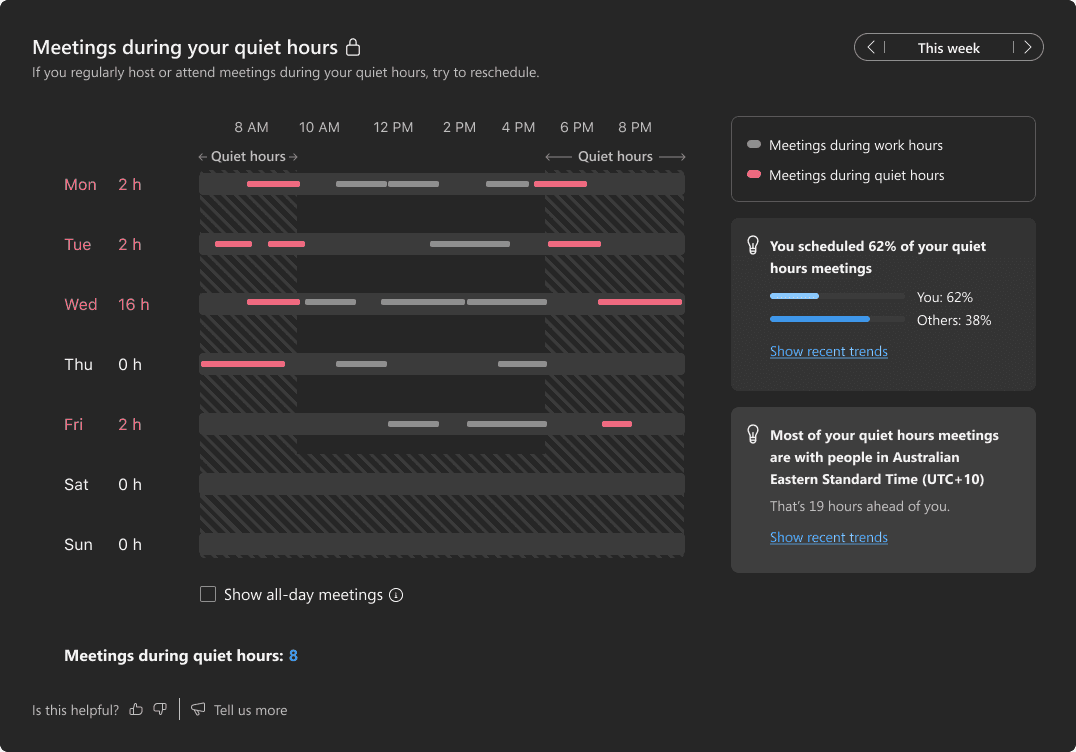
From sentiment work-life balance to actionable plan
An earlier version of this section surfaced well-being sentiment scores. Research showed vague sentiment data created anxiety without enabling action. The calendar replaced it entirely. Red blocks show meetings that land inside your quiet hours window.
The stat "You scheduled 62% of your quiet hours meetings" is specific enough to act on immediately. The user does not interpret a burnout score. They look at Wednesday, see the red blocks, and reschedule. Data that tells you what to do next is fundamentally different from data that tells you how you are doing.
Accessibility as a design system contribution
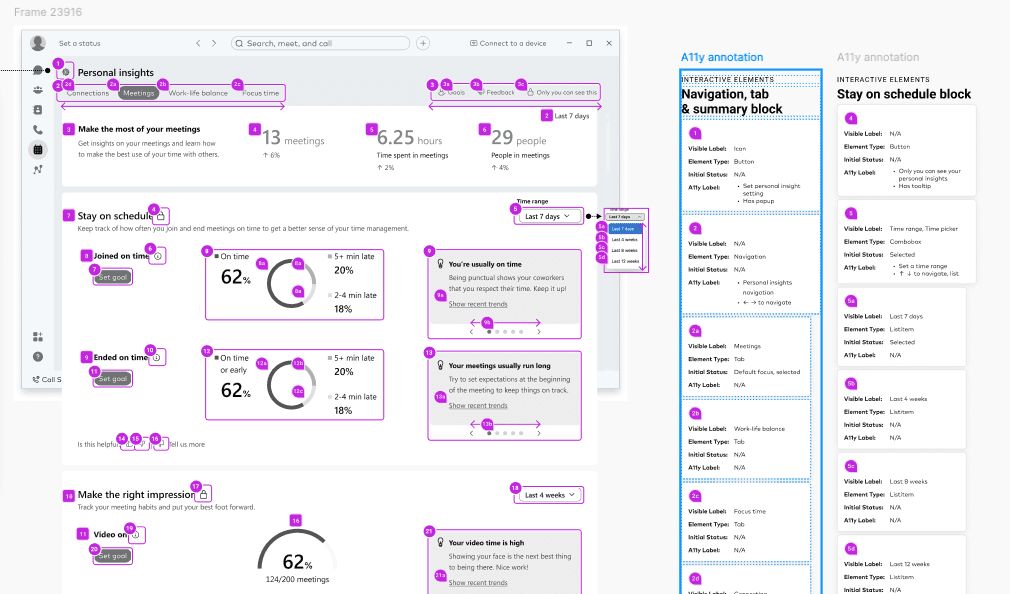
Accessibility was not a compliance step at the end. I partnered with accessibility evaluators and engineering from early in the process, resolving 140 accessibility tickets to reach WCAG 2.2 AAA compliance. Full support for VoiceOver, keyboard navigation, and RTL languages. I also worked closely with the Cisco Design System team to contribute our custom components back into the broader library rather than building in isolation.
What shipped
What this project changed in how I work
Trust is not a feature. It is not a privacy toggle or a disclaimer. It lives in every visual choice, every label, every piece of data you choose to show or withhold. The decision to cut the location feature was not a product decision. It was a design decision about what kind of relationship we wanted users to have with this tool.
I started this project evaluating concepts on functional performance. I ended it evaluating concepts on emotional response first. That shift changed how I approach every data product I have worked on since. Before testing any data feature, I now ask two questions:
How might someone misinterpret this, and what is the worst assumption a user could make about who sees it? I did not have that habit at the start of this project. The research showed me I needed it.