SAP X AAM
Year
2026 - Ongoing
Scope
AI Framework, Vibe coding
Compay
SAP
Most enterprise design concepts die between Figma and engineering.
AAM was built to survive that gap: a working multi-screen operations dashboard for oil and gas, prototyped by one designer using Claude Code as the build tool, with interactive 3D terrain maps, embedded WebGL visualizations, and live AI panels shipped in hours, not sprints, governed by a design system that enforced itself.
Role
Full stack designer, end to end AI Framework.
Scope
Concept Design, Design System, AI-Native Prototyping
Context
SAP future of UX, leadership pitch
What this project is?
AAM, Automated Asset Management, is a northern star concept for an oil and gas pipeline monitoring dashboard within the SAP ecosystem. Not a production ship. A leadership pitch proving a future direction is buildable within real SAP constraints, resourced with one designer and Claude Code as the primary build tool.
Enterprise concept work has a specific failure mode. You design something visually compelling, present it, get stakeholder excitement, and watch it die in translation. Engineering says it does not match the design system. The gap between concept and production is invisible until it is too late.
AAM was designed from the start to close that gap. Every screen was a working HTML prototype. Every design decision was governed by a token system. Every constraint was documented in a format that Claude Code could read and enforce automatically.
What shipped
Final Concept
Design system first, then clone to version
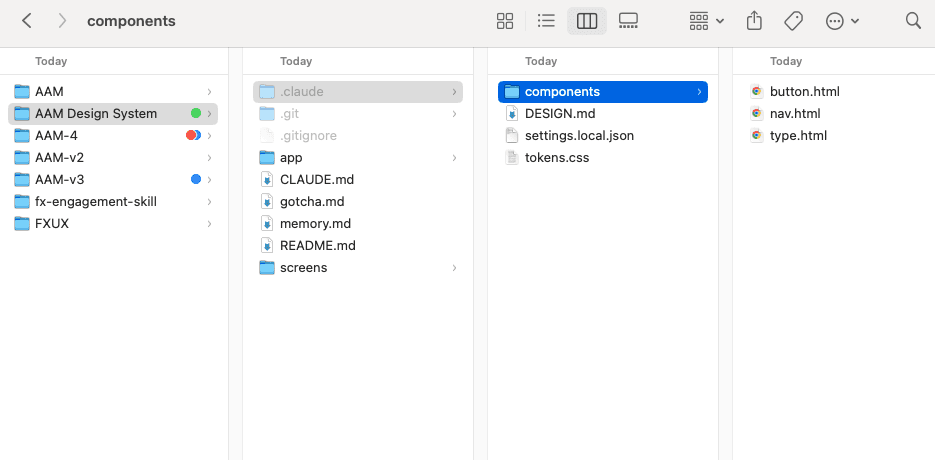
Build the AAM Design System: lock what must never change
Before any dashboard screen was built, the component foundation was solidified in a dedicated AAM Design System repository. Nav, button, and token files were iterated until they were genuinely done, not probably done. Every pixel width, every hover state, every token name. The goal was to reach a point where these files could be committed and never touched again. Locked components you trust are worth more than flexible components you second-guess every session.
Clone to create each design direction
Once the components were locked, AAM Design System became the source of truth every version cloned from. AAM, AAM-v2, AAM-v3, AAM-4: all started with the same locked nav.html, button.html, tokens.css. The only file that changed per version was DESIGN.md, which defined the aesthetic direction for that branch. Same components underneath. Completely different visual character on top.
Direct Claude Code through CLAUDE.md and DESIGN.md
Within each version, Claude Code was directed through two documents: CLAUDE.md for session context and hard constraints, DESIGN.md for aesthetic direction. Every session started by reading both. The locked component files enforced structural consistency automatically. DESIGN.md gave Claude Code creative latitude within that structure.
Isolate complex rendering environments, then integrate
Screens requiring Three.js and WebGL were built as standalone sandbox files first: no nav, no shell, no token imports. terrain-test.html let the Three.js scene be iterated freely with no overhead. Once the scene was right, it was embedded into the main screen via iframe using an ?embed= URL parameter stripping everything except the canvas. The shell styled only the container. The iframe managed its own rendering context entirely. This kept CSS conflicts, z-index bleed, and token interference from compounding.
AI as the framework, not the a magic wand
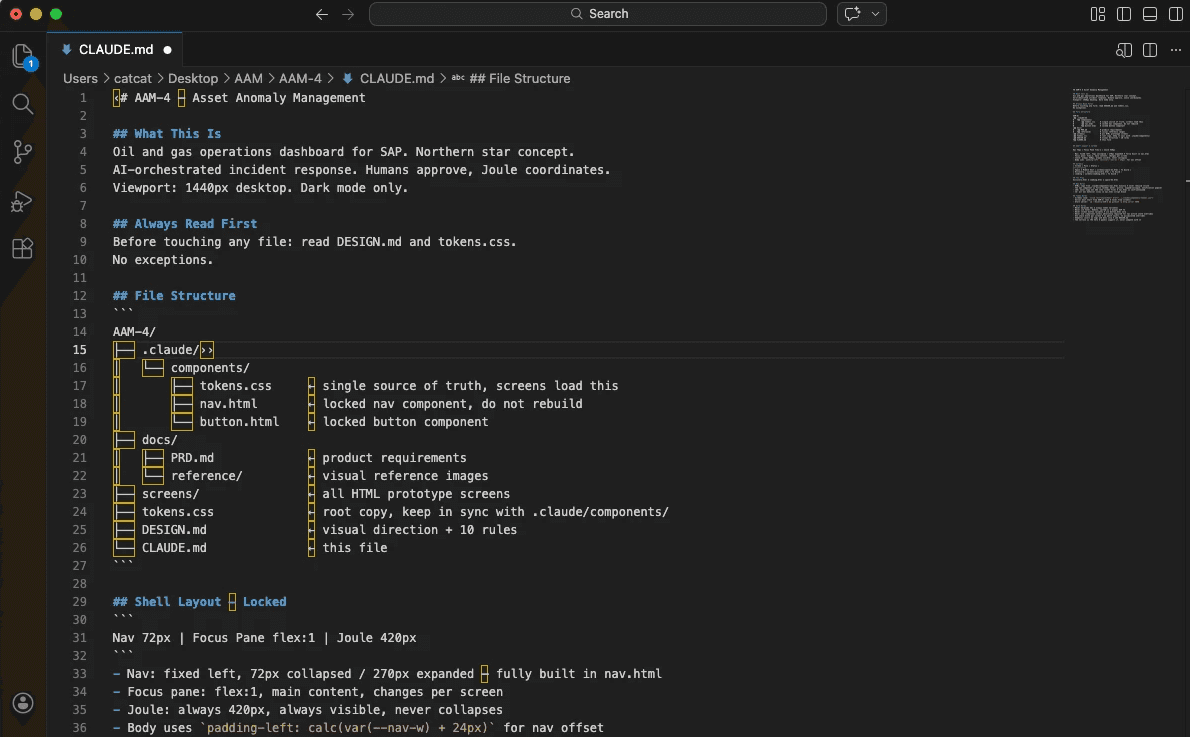
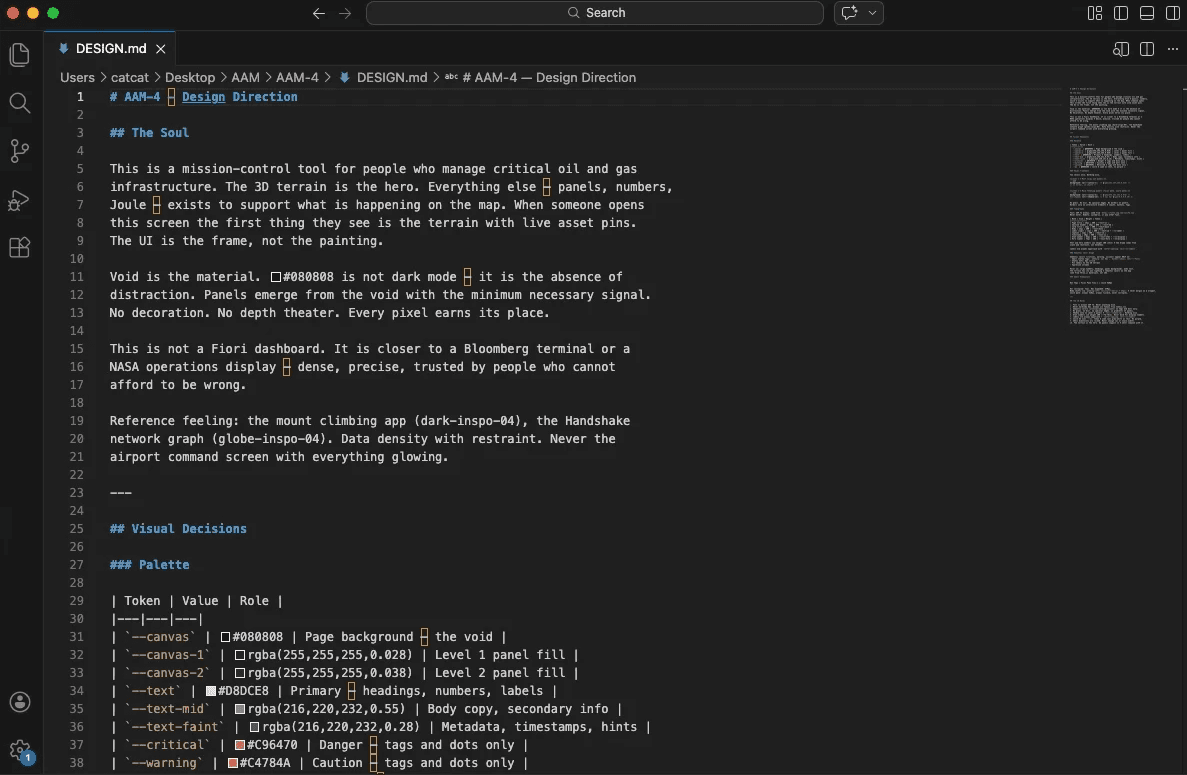
Every governing document was produced through conversation and commands, not written manually. CLAUDE.md was commanded into existence by describing the project, the constraints, and the hard rules in conversation. Claude structured that into the exact format Claude Code expects as its first read every session. DESIGN.md was validated visually through a rendered token preview in the Claude chat before being formalized as a document. When a rule broke something, a command added it in specific terms.
The folder was the design team
No PM. No creative director. No engineering lead. Each file played a role. The project ran because every team function had a document that governed it, produced through commands, read automatically by Claude Code every session.
• PRD.md: Product Manager
• DESIGN.md: Creative Director
• CLAUDE.md: Engineering Lead
• tokens.css: Design Systems
• Components (nav.html / button.html): UI Engineer
• Screens (demo.html): Interaction Designer
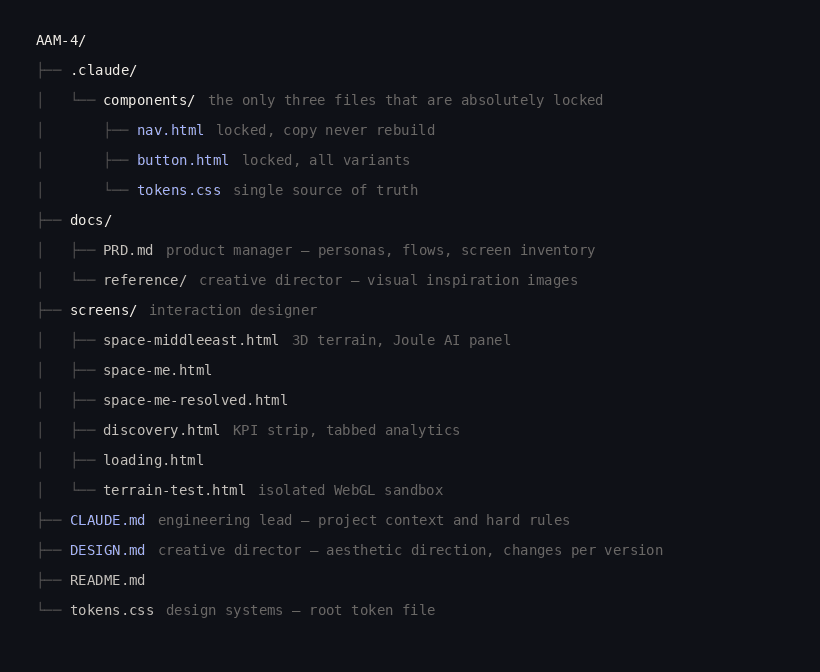
Three locked files. One CLAUDE.md. One DESIGN.md. That is the entire governance layer. Before generating any screen, Claude Code reads nav.html, button.html, and tokens.css. Every screen is consistent by construction, not by correction after the fact.
Over-governed systems limit what AI can do
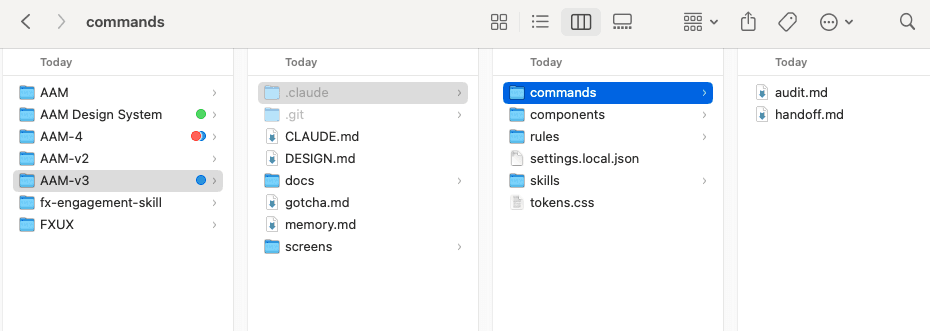
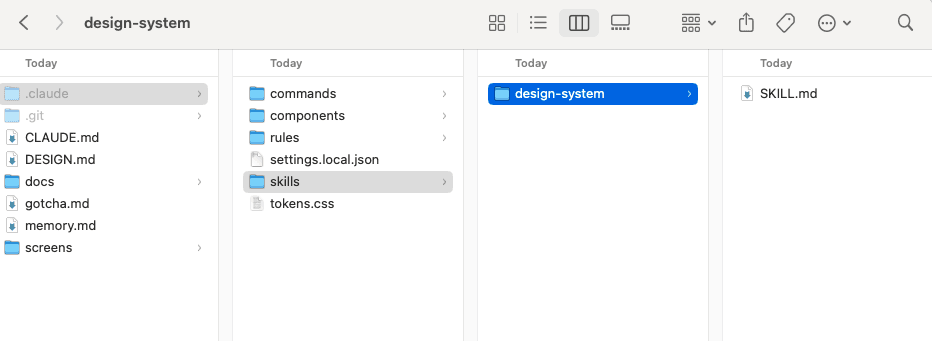
V2 and V3 were over-governed. A SKILL.md that auto-triggered on every new screen. An audit command scanning for violations. A handoff command generating project summaries. Memory.md for session continuity. Gotcha.md tracking failures. Rules distributed across five or more files that Claude Code had to read and reconcile before doing anything.
v1, 2 and v3: too much harness
Rigid in the wrong places
SKILL.md auto-triggering on every screen
audit.md scanning for violations
handoff.md generating project summaries
memory.md for session continuity
gotcha.md tracking failures
Rules across 5 files creating conflicts
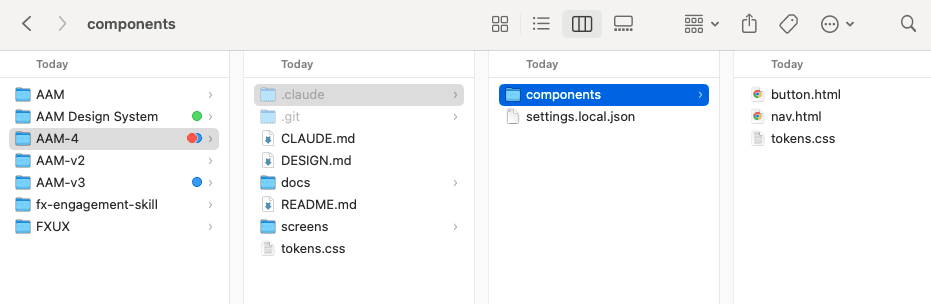
AAM-4: minimal and intentional
Rigid only where it matters
nav.html locked
button.html locked
tokens.css locked
CLAUDE.md for context and constraints
DESIGN.md for aesthetic direction
Everything else: designer freedom
The theory was sound: more governance means more consistency. The reality was the opposite. Claude Code spent a significant portion of every session reading and reconciling files. Token usage went into review overhead rather than output. When design direction needed to shift, updating one file conflicted with a rule in another.
The bigger problem: too many governing documents limited how far Claude Code could be pushed aesthetically. Twelve rules about how screens should look becomes an obstacle when you want to try something unexpected. The system was rigid in the wrong places: not rigid about component integrity, but rigid about design direction, which is exactly what should stay flexible during concept work.
"Lock what should never change. Leave everything else open."
AAM-4 stripped it back. Design exploration got faster. Screens stayed structurally consistent. Memory.md and gotcha.md remain planned additions for when the project moves toward handoff rather than exploration.
Isolate, iterate, integrate
Isolate
WebGL globe and terrain-test.html: standalone sandbox, no nav, no shell, no token imports. Just the Three.js scene at full viewport. Iterate without risk.
Iterate
With no shell overhead, push the 3D scene aggressively. Globe interaction, terrain shape, pin placement, lighting, particle systems. The creative work happened in isolation.
Integrate
Embed the finished scene into the main screen via iframe with "?embed= param." The shell styled only the container. The iframe owned its rendering context.
AAM-4 as a shared starting point
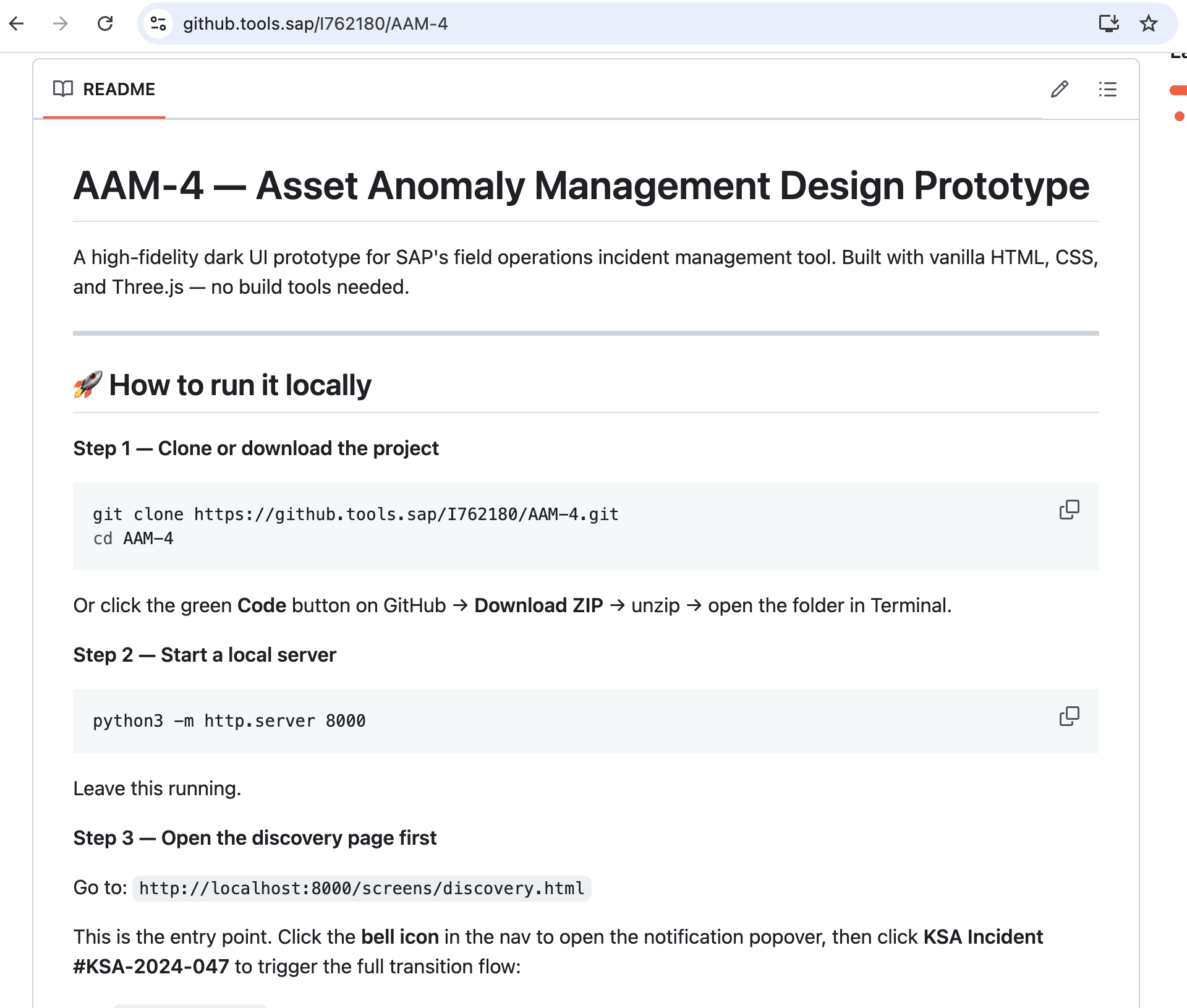
AAM-4 was pushed to SAP's internal Git as a cloneable foundation for other designers and PMs on the team. The idea: you should not have to rebuild the design system from scratch every time you want to explore a new dashboard direction. Clone the repo, change one file, get a completely different aesthetic, and host your own version.
The README is the onboarding document. It covers three things. How to host the demo locally: one terminal command, navigate to the project folder, run a local server, open the screens in a browser. No build tools. No dependencies. Any designer or PM can see a working prototype in under two minutes. Which folder to copy when starting a new direction: .claude/components/ is the locked foundation. Copy those three files. Do not touch them. Everything else is yours. What to modify to bring your own vision to life: rewrite DESIGN.md with a new aesthetic direction, rewrite CLAUDE.md to adjust hard constraints, rewrite PRD.md to pitch a different product. Change any one of these three and Claude Code generates in a completely different direction while the nav, buttons, and token structure stay consistent.
AAM-4 is not a finished project. It is a launchpad. A designer exploring a light mode direction clones it and rewrites DESIGN.md. A PM pitching a different product concept clones it and rewrites PRD.md. The locked components mean every version that comes out of it looks like it belongs to the same system, even when the direction is completely different.
Stakeholder buy-in and scope extension
AAM-4 was delivered and presented to internal stakeholders and sponsors. The concept landed. Leadership buy-in was secured and the project officially extended scope beyond the initial northern star concept.
The next phase is an end-to-end concept dashboard built for major enterprise clients: RWE, an energy company operating across power generation and renewables, and ConocoPhillips, one of the world's largest independent oil and gas companies. These are not internal demos. They are client-facing concepts showing what AI-native operations monitoring could look like at the scale and complexity of global energy infrastructure.
The foundation that makes this possible is the same three locked files, the same DESIGN.md-driven direction system, and the same isolate-then-integrate approach to complex rendering. The project scaled because the system was designed to scale from the start
Every decision in this project had to be articulated precisely enough that an AI could execute it correctly.
Knowing that cyan should be reserved for live telemetry and never used for UI actions is a design decision.
Knowing that the nav rail must be 140px and never change is a layout decision.
Knowing that too many governing documents limits rather than enables AI creativity is a design systems insight that took two full versions to learn.
The concept delivered stakeholder buy-in not because it looked impressive in Figma, but because it was a working prototype that proved the direction was buildable. That is what AI-native prototyping makes possible: closing the gap between the concept and the proof before you ever get to the room.
AI-native design work is not about using AI tools as a buzz-tool. It is about having design intent precise enough to direct AI execution, and knowing when to get out of its way.